
Since geography plays into asset performance tracking, we have added a new “city” field so you can enter it when an Asset is added to Pereview.
Additionally, we have simplified the variance comments process for Asset Managers and other users entering, reviewing, and updating commentary. This includes a new overwrite warning message, the ability to copy comments, and enhanced period-level general comments. Learn more in our Knowledge Base.
Asset Variances — Overwrite Warning
What does it do?
When a user begins entering or modifying a variance comment that already contains content, Pereview now displays a warning prompt before allowing the overwrite. The warning gives the user an opportunity to review the existing comment before deciding whether to replace it.
This is particularly important for Pereview instances where both asset managers and other usrs have access to the variance screen, it is easy to unknowingly overwrite commentary that another team member has already entered.
Where is it located?
Asset menu → select an Asset → Variances tab. The warning appears inline when editing a comment field that already has content.
Asset Variances — Copy Comments Button
What does it do?
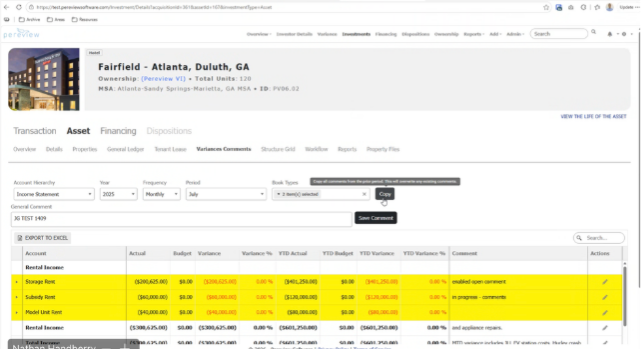
A new Copy Comments button on the Asset Variances screen allows users to bring all comments from the prior period into the current period in a single action. The operation copies both individual line-item variance explanations and the period-level summary comment (see below).
Many variance explanations recur month over month—ongoing lease-up delays, known seasonal maintenance costs, standing litigation reserves. Requiring teams to retype these each period adds friction to the monthly close cycle and introduces risk of inconsistency. Copy Comments gives teams a pre-populated starting point to edit, not a blank slate.
How will clients use it?
- Navigate to the Asset Variances screen for the current period (e.g., May 2026).
- Click the Copy Comments button.
- All comments from the prior period (April 2026) are copied into the corresponding current-period fields.
- Edit copied comments as needed to reflect the current period’s specific conditions.
- Note: if comments already exist in the current period, the Overwrite Warning fires before replacing them.
- Summarize overall property performance for the period (e.g., “May results reflect the final month of transition to new property management.”).
- Flag macro-level drivers—weather events, market conditions, tenant disputes—that affected multiple line items.
- Produce an executive-ready summary that feeds investor reports or board decks without requiring readers to parse individual rows.
- This comment is included in the Copy Comments operation, so prior-period narratives carry forward automatically.
Where is it located?
Asset menu → select an Asset → Variances tab. The Copy Comments button appears in the screen toolbar.
Asset Variances — Period-Level General Comment
What does it do?
A new period-level general comment field has been added to the Asset Variances screen. Unlike individual line-item comments (which are tied to a specific variance row), this field captures a high-level narrative for the period as a whole.
Asset managers and investor reporting teams often need a single narrative that explains the overall story for the period—macro factors, property transitions, or portfolio-level context that doesn’t belong on any one line item. Without a dedicated field, teams were workarounding this by overloading individual variance comment fields or maintaining separate notes outside the platform.
How will clients use it?
- Summarize overall property performance for the period (e.g., “May results reflect the final month of transition to new property management.”).
- Flag macro-level drivers—weather events, market conditions, tenant disputes—that affected multiple line items.
- Produce an executive-ready summary that feeds investor reports or board decks without requiring readers to parse individual rows.
- This comment is included in the Copy Comments operation, so prior-period narratives carry forward automatically.
Where is it located?
Asset menu → select an Asset → Variances tab. The period-level general comment field appears at the top of the variance screen, above the line-item grid.